Kyvos’s latest release – 2022.2 brings in support for Amazon Athena to accelerate raw data querying on AWS. You can now run interactive ad hoc queries against any amount of data in S3 without investing in additional infrastructure.
Amazon Athena is a serverless query engine that enables businesses to analyze data using SQL directly on Amazon S3. And we offer full support for this engine to perform fast multidimensional analytics using any BI tool of your choice, including Tableau, MicroStrategy, and many others.
How Do Businesses Benefit from Kyvos + Athena
When BI specialists and data leaders use different databases for historical or predictive analysis, they run SQL queries and generate reports to find KPIs in vast data volumes. Aggregating the same data for ad hoc queries (for example, customer complaints) from various data sources is easier said than done. When data comes from different sources, the dependency on data engineering increases to build ML models or run queries faster.
Kyvos supports SQL engines for running raw data queries by building smartly aggregated data models on the cloud. But when on-demand clusters run queries on Hive or Spark, the spin-up time it takes to return queries increases the wait time for analysts. With Athena support, this issue is resolved as this engine comes with minimal boot-up time, can run concurrent requests, works directly on S3, and reads metadata on AWS Glue.
With Athena support, Kyvos enables instant raw data querying without any speed or scale barriers. The queries return faster, even for complex and extremely large datasets, enabling faster and better decision-making.
Get the most out of your data source with benefits like:
- Support for standard data formats, including JSON, CSV, Avro, ORC, and Apache Parquet
- Cost-effective analytics with no need to manage additional infrastructure. Pay only for the queries run on your BI ecosystem
- Faster time-to-insight because Athena ensures faster query performance on Amazon S3 by executing multiple queries in parallel
- Enhanced data accessibility as Athena utilizes compute resources from different facilities, enabling automatic routing if any facility is rendered inaccessible at any time.
- Unified view of your S3 data by defining all metadata and business logic in one place using Kyvos Semantic Layer. As a result, business teams across the enterprise can access the same source of truth with full confidence in its integrity for self-service analytics.
- No impact on underlying data when creating or removing schemas
What Do You Need to Work with Athena on Kyvos?
Now that you know how Athena Support on Kyvos is set to make your analytical initiatives better, faster, and bigger, it’s time to deep-dive into its working. Before getting started, ensure that your permissions to run queries include the following:
- S3 locations where the data to be queried is stored
- Databases and tables in the Amazon Glue catalog
- API actions for Athena connection
Getting Started to View or Set up an Athena Connection
Amazon Athena connects directly using Kyvos Connection with the following steps:
- S3 locations where the data to be queried is stored
- Databases and tables in the Amazon Glue catalog
- API actions for Athena connection
Details to Configure Settings
Category: Choose SQL Engine
Catalog: Specify your data source in Athena
Authentication: Select default IAM – Instance profile credentials
Raw Data Connection: Click Is Default SQL Engine to enable raw data connection
S3 Location Type: There are three options in this field–
- Kyvos Defined, where Kyvos creates a folder in a configured directory
- Workgroup Defined, where Athena fetches location from workgroup settings
- User Defined, where a user needs to provide an S3 location to dump the query
S3 Location: Give the location of your S3 bucket but note that this option appears only if you select User Defined in S3 Location Type
URL: Provide Amazon Athena URL (For example, jdbc:awsathena://athena.us-east-1.amazonaws.com:443)
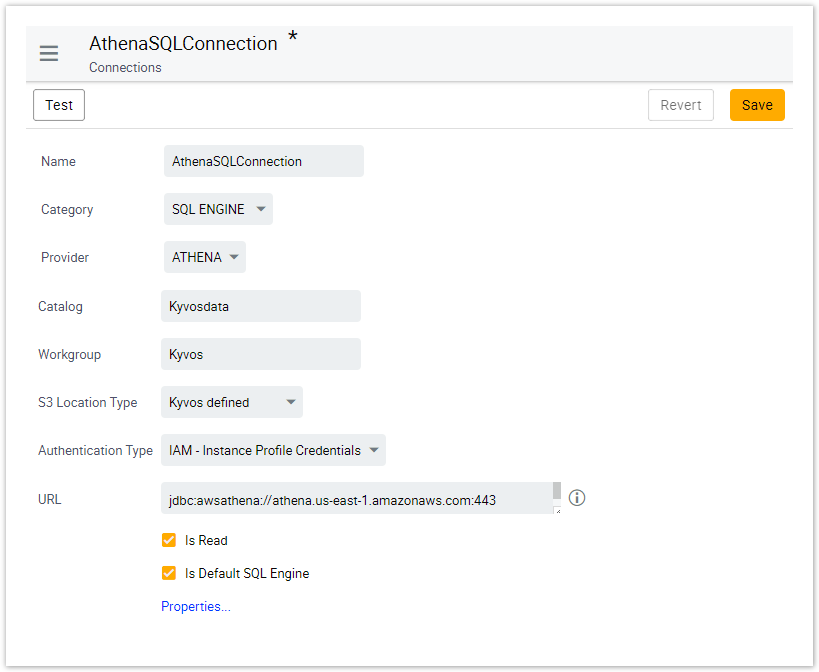
Sample Athena Connection on Kyvos
Since Amazon Athena uses SSL for all functions, don’t forget to add port 443 to the URL.
With this simplified setup and next-gen support, you can now easily choose the data you want to analyze, define schemas, and build data models for fast and interactive data analytics on the cloud.
Looking Ahead with Version 2022.2
The advanced features in Kyvos 2022.2 are designed to improve overall BI capabilities and productivity across the board for organizations grappling with insanely high data volumes. Here are a few glimpses from this release:
- Enhanced column-level security
- Better incremental data refreshes for fast adjustments
- Enhanced sliding window feature
- Web Accessibility
- Query performance optimization







 Scale


 London

 Oct 11, 2022

