Microsoft Excel is one of the most popular analytics tools that has been around for ages. Though enterprises today use advanced BI tools such as Tableau, MicroStrategy, Qlik, and others, a significant chunk of business users and analysts still prefer to work on Excel. Two key reasons for its popularity are – it is familiar and inexpensive. As most users already have the Microsoft Office Suite installed on their computers and have been using it since grade school, it is one of the top choices for BI analysts. Excel, for sure, is not going away anytime soon.
Modern Data Ecosystem and the Cloud Shift
With all the enterprise data moving to the cloud, it becomes challenging for Excel to keep up with the cloud’s native flexibility and scalability. Neither can it scale for the amount of data on the cloud, nor can it support hundreds of metrics needed for modern-day analytics. Hence, it becomes challenging to use Excel on modern data platforms.
As data volumes rise, Excel generally becomes unresponsive and fails to respond to queries. For example, if you load a huge dataset, you will notice immediate slowdowns, sluggish navigation, and updating cells will take several minutes, if not hours. I have seen several real-life business use cases where analysts find it difficult to load even a single day of data in Excel. Analyzing over more extended periods is almost impossible.
Besides this, complex calculations are difficult to achieve. You need to be an Excel expert or depend on IT expertise to define formulas, calculations, create complex data models to start your analysis. In this blog, I will explain how you can use Kyvos to perform advanced analytics on modern data platforms using Excel, without being limited by data size or worrying about performance issues.
Connect Excel to Your Cloud Data Warehouse or Storage
The way Kyvos works is that it builds a semantic layer directly on your cloud data platform. Once this layer is created, you can use Excel to access and analyze massive volumes of data on cloud platforms such as Amazon Web Services, Google Cloud Platform, or Microsoft Azure. You can also connect to cloud data warehouses, such as Snowflake, Amazon Redshift, Google BigQuery, or Azure Data Warehouse.
Kyvos not only enables a seamless connection to modern data platforms but also delivers exceptionally high performance on queries. Imagine being able to perform multidimensional analysis using Excel at a speed and scale that were unthinkable before. Let’s deep dive and understand the technology that drives this capability.
Bringing the Power of the Semantic Layer to Excel
Excel was not designed for business analytics and cannot deal with complex analytical use cases or handle massive enterprise-scale data. That’s where Kyvos semantic layer changes the game. It bridges the gap between raw enterprise data and Excel, enabling users to analyze governed, aggregated data with speed and at any scale.
Traditional Excel-based analysis struggles with performance bottlenecks, long query times and limitations in handling large datasets. As data volumes grow, spreadsheets slow down, making it nearly impossible to analyze data interactively or at scale.
Kyvos eliminates these constraints by centralizing and standardizing business logic and definitions. It creates smart aggregates to save costs on the cloud and ensures that everyone is working with a single version of truth, without facing performance delays.
Once the data models are built, users can query them limitlessly and get instant responses for even the most complex queries. They can fire as many queries as they need without exploding BI costs. There are no Excel-related performance lags and users can work seamlessly with their cloud data using Excel.
Transform Excel Into an Analytical Powerhouse
Kyvos connects with Excel, transforming it into a cloud-native BI tool. Some of the benefits of using Kyvos with Excel are:
- Scale: As most of you would have experienced, running Excel queries on large volumes of data make it unresponsive. Similarly, loading millions of rows on Excel would take days altogether! With Kyvos, you can query trillions of rows in Excel and get your responses within seconds.
- Performance: While working with large datasets in Excel, queries take minutes, if not hours, and sometimes even fail to load. Kyvos delivers sub-second responses for all queries, irrespective of the size of your data. Additionally, there are no concurrency issues, as thousands of users can query any amount of data without impacting performance.
- Unified view: When using Excel for BI, most users have different schemas and metadata. As a result, different teams and users may get different results for the same set of queries. With Kyvos, you can define all your metadata and business logic in one place, and enable teams across your enterprise to access the same source of truth. Further, it removes the dependency on IT teams and Excel experts to create complex formulas and functions for different users, tools, and reports.
- Accurate analysis with multidimensional modeling: You can define multidimensional models, complex hierarchical schemas, calculated members, semi-additive measures, custom roll-ups in Kyvos using the intuitive UI. Once done, you can easily access these models in Excel.
- Ease to use: Another major problem with Excel is that you need Excel expertise to build reports, dashboards, and run queries. Else, you have to depend upon the IT teams to create these for you. With Kyvos, you can analyze data from different sources and build reports and dashboards without the need for IT assistance. The drag and drop UI enables quick reporting and analysis, reducing dependency on other teams.
How to connect Excel to Kyvos
Connecting Excel to Kyvos is simple and quick. All you need to do is perform a few simple steps, and you are ready to browse your cloud data via the Kyvos model.
Here are the detailed steps.
- On your Excel worksheet, go to Data > From Other Sources > From Analysis Service.
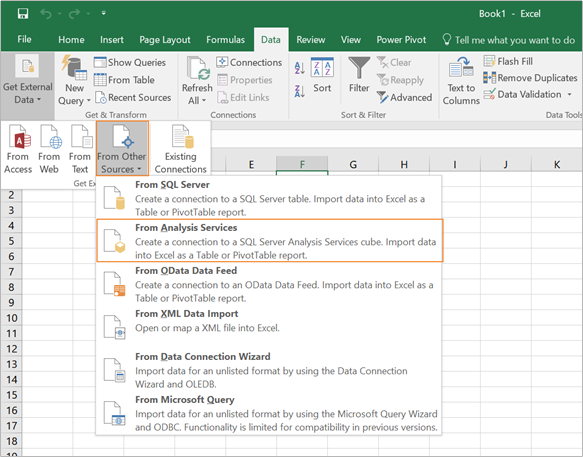
Figure 1. Connecting MS Excel to Kyvos Data Model
2. On the displayed Data Connection Wizard, provide the connection information.
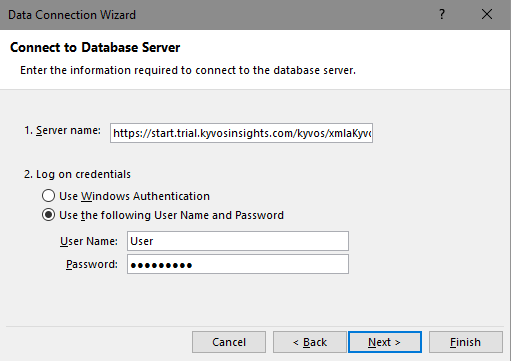
Figure 2. Data Connection Wizard
-
- URL/Server: This is the server URL. Enter as http://<ServerName>://xmlaKyvos
Here,
<ServerName> is the IP address or DSN name of your Kyvos server.
<Port> is the port number on which Kyvos listens.
<kyvos> is the web app name.
- User/Password: Use your Kyvos username and password for authentication.
In some cases, the connector won’t allow you to enter the user information. In such cases, try the URL as http://ServerName:port/kyvos/xmlaKyvos?username=JohnSmith&password=Secret
Here, JohnSmith is the username, and Secret is the password.
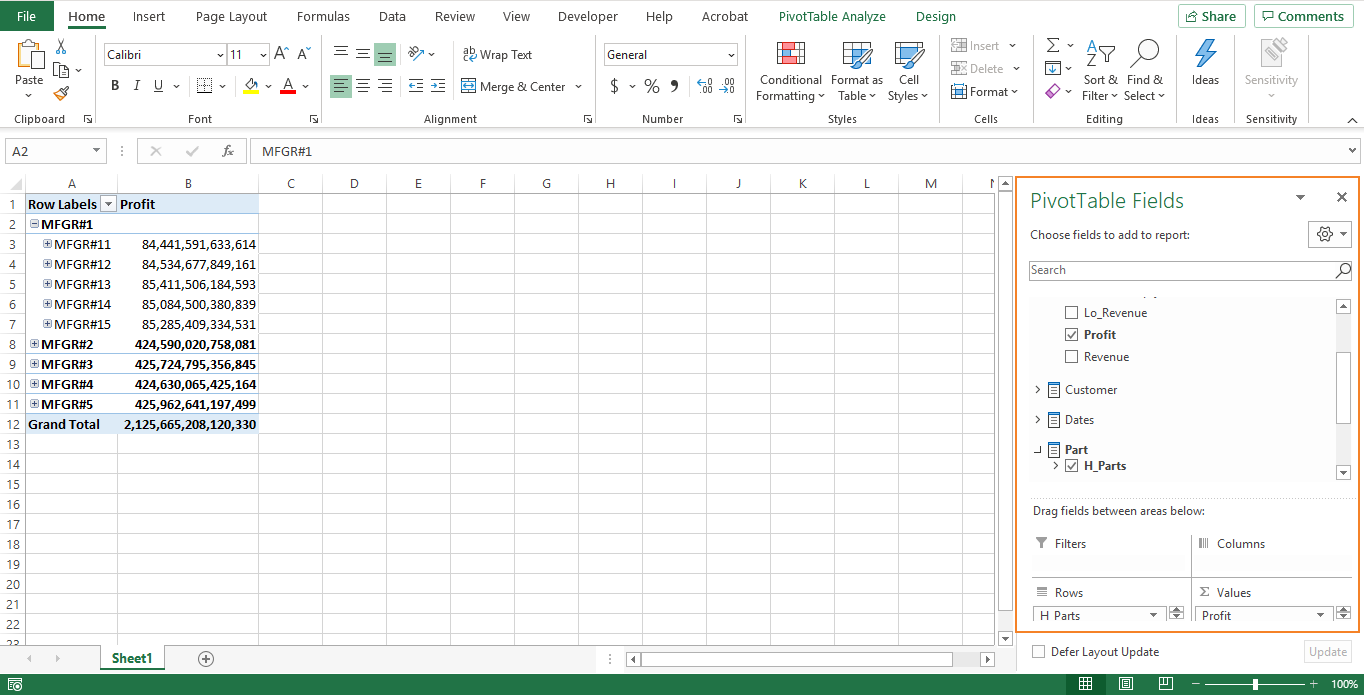
The Kyvos semantic model will load in your worksheet. All your business logic is abstracted and presented in the form of measures and filters. You can now start browsing the models. This example shows profit against parts.
Quick Recap
Excel was not designed for enterprise-class analytics and reporting, and so it has its share of challenges when used for this purpose. Kyvos brings the power of semantic layer to Excel, enabling multidimensional analytics at an unprecedented scale and speed. With Kyvos, you can use your MS Excel spreadsheets to generate reports on any amount of data instantaneously.
To see Kyvos live in action with your Excel worksheets, request a demo today!







 Scale


 London

 Aug 31, 2020
