Cloud data warehouses are being touted as the next big thing for business analytics. Several enterprises have either moved or considering migrating their data loads to the Google Cloud Platform and use Google BigQuery for their BI needs. However, there are some key questions that need to be addressed. Is it possible to achieve multidimensional analytics at interactive speeds? Can we get the same performance while dealing with trillions of rows or billions of cardinalities? How would performance be impacted if concurrency increases to thousands of users, and most importantly – does it offer self-service analytics?
In this blog, I will discuss how Kyvos enables self-service, multidimensional analytics on Google BigQuery, delivering speed-of-thought analysis for trillions of rows. I will also explain how you can quickly connect your BigQuery data warehouse to Kyvos and start building AI-powered smart aggregates for multidimensional analysis.
Kyvos + Google BigQuery = Interactive Multidimensional Analytics at Massive Scale
Google BigQuery allows you to run queries on vast volumes of data using a SQL interface. However, as it works with SQL over tables stored in columnar format, multidimensional analytics is not possible. Further, as the query complexity increases, query performance decreases.
Running complex queries on a consumption-based pricing plan increases the costs exponentially. If you buy more slots to accommodate your workload, it adds to your already high bills. Besides these, you need SQL expertise to create queries.
Kyvos brings the power of multidimensional analytics to data in BigQuery and the Google Cloud Platform (GCP). Using Kyvos, you can build data models on top of your BigQuery warehouse and store them in Google Cloud Storage.
Some of the key benefits of using Kyvos with your BigQuery warehouse are:
- Multidimensional analytics with AI-powered smart aggregation: Kyvos allows multidimensional analysis by creating data models on your data in BigQuery. Kyvos smartly aggregates calculations on trillions of rows, and enables MDX or SQL querying that delivers instantaneous responses.
- Hierarchical Analysis with Custom Rollups: Kyvos supports balanced, unbalanced, ragged, and alternate hierarchies and custom rollups. As opposed to the flat table structure of BigQuery, Kyvos allows you to analyze hierarchical data and define how the child values roll into parent values.
- Simplified data modeling: Kyvos’ intuitive user interface eliminates the need to write SQL queries. You can use the drag and drop interface to create multi fact physical schemas and deal with complex logical hierarchies. The ML-powered recommendations engine analyzes query patterns and provides intelligent recommendations for design optimization so that you can get productive right away.
- Unified Semantic Layer: Kyvos creates a single, unified semantic layer where you can define all your metadata and business logic. This helps create a consistent view of data for users across the enterprise. The same model is available to all business users regardless of the BI tool they use.
- Seamless integration with GCP Security: In addition to its built-in security framework, Kyvos integrates seamlessly with the Google Cloud Platform security. Kyvos also integrates with user management and authentication services, ensuring adherence to the most stringent security norms.
- SQL and MDX connectivity for interactive analysis: Kyvos comes with built-in SQL and MDX engines, and supports both SQL and MDX connectivity. You can interactively analyze your BigQuery data in any visualization tool of your choice. Using Kyvos, you can create live connections with tools like Tableau, MicroStrategy, MS Excel, MS PowerBI, and others, for real-time analysis. You can also use data science tools like R and Python for your analysis.
Creating a connection for Google BigQuery warehouse
To start creating data models on BigQuery, you need to create a data connection between Kyvos and BigQuery. You can create the connection quickly from the Kyvos user interface. For this, perform the following steps.
- From the Toolbox, click Setup, then Connections.
- From the Actions menu ( ⋮ ) click Add Connection.
- Enter a name or select it from the Connection list.
- Select Warehouse from the Category List.
There may be more than one warehouse connection.
- For Providers, select BigQuery.
- Specify the Server to access Google APIs. For example, https://www.googleapis.com.
- Enter your Google Project ID for the Google Cloud Platform.
- For Authentication Type, select Application Default Credentials.
- Click Properties to configure advanced settings. For example: to enable Views in BigQuery, set the value for viewsEnabled as true.
- Click Save.
To refresh connections, click the menu ( ⋮ ) at the top of the Connections column and select Refresh.
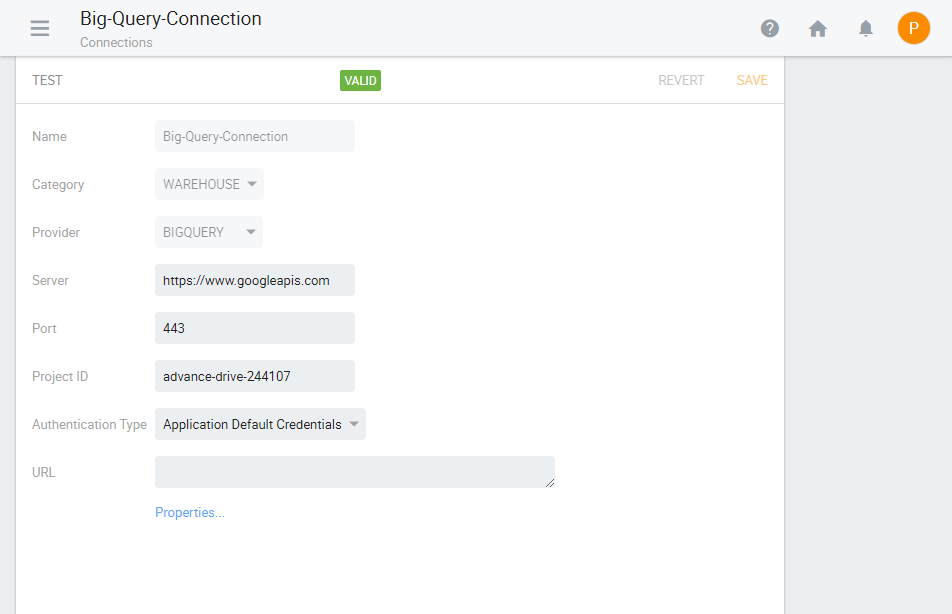
Figure 1. Sample BigQuery Connection
The schedule is created and displayed, as shown in the following figure.
You can now register files to identify the data that you want to analyze, create data relationships to define schemas, and build data models for interactive analysis on your data.
Conclusion
Kyvos brings the power of multidimensional analytics on flat table structure. As the entire data is aggregated, all queries, standard or ad-hoc, old or new, are served equally fast. Kyvos lets you build data models on top of your BigQuery warehouse, which you can then connect to any BI or data science tool for visualization using SQL or MDX connectivity. You can run multidimensional reports on Google BigQuery and create interactive dashboards and workbooks too.
To see Kyvos in action on Google BigQuery, request a demo today.







 Scale


 London

 Aug 13, 2020
